
Ways to Onboard a New Sales Team Member Remotely

Remote sales onboarding needs a clear plan, not a string of video calls. Onboarding a new sales team member remotely works best when you prepare their tools before day one, combine company-wide and role-specific training, and set milestones across the first 90 days. Regular one-to-ones and timely feedback help the new hire build confidence while learning the sales process.
It’s easy to see why remote onboarding can feel harder: informal conversations and quick questions don’t happen naturally when a team is distributed. A structured approach can make expectations visible and help new starters feel connected from the beginning. This guide covers practical ways to communicate company culture, track progress, and automate repeatable onboarding tasks, from account access and welcome messages to training reminders. You’ll also learn how to shape a 30-60-90 day plan around the role, so each stage builds towards independent selling without overwhelming the new team member.
Table of Contents
1. How to onboard remote sales employees?
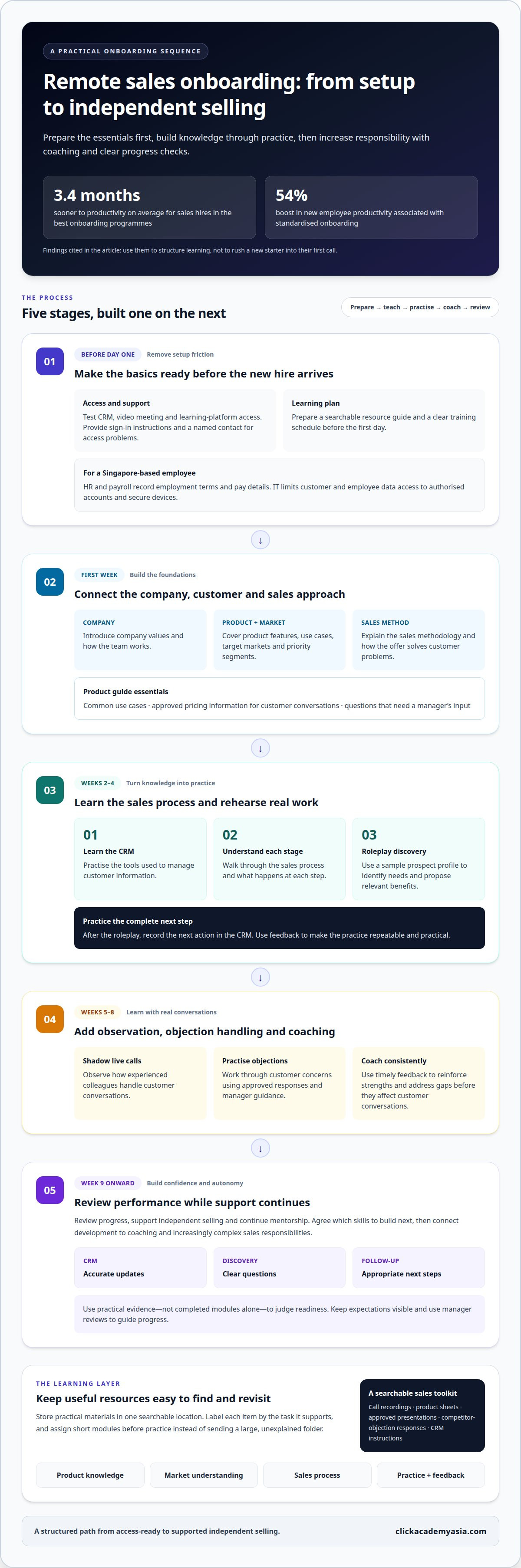
A strong onboarding process turns product knowledge into confident customer conversations. Sales hires in the best onboarding programmes become productive 3.4 months sooner on average. Standardised onboarding has also been associated with a 54% boost in new employee productivity. Use these findings to structure learning, not rush a new starter into their first call.
Before day one, prepare system access, a searchable resource guide and a clear training schedule. During the first week, introduce company values, product features, target markets and the sales methodology. Explain how the offer solves customer problems, which segments to prioritise and how the team qualifies prospects. A concise product guide should cover common use cases, approved pricing information for customer conversations and questions that need a manager’s input.
Move from knowledge to practice in stages. During weeks 2-4, teach the CRM, explain each sales-process stage and practise discovery calls through roleplay. Give the employee a sample prospect profile and ask them to identify needs, propose relevant benefits and record the next action in the CRM. In weeks 5-8, add live-call shadowing, objection handling and coaching. From week 9 onward, review performance, support independent selling and continue mentorship.
Keep training practical and easy to revisit. Organise call recordings, product sheets, approved presentations, responses to competitor objections and CRM instructions in one searchable location. Label resources by task, such as “prepare for discovery” or “log a follow-up”. Managers can assign short modules before practice sessions instead of sending a new hire a large, unexplained folder.
Product: Explain features through customer needs and real use cases.
Market: Clarify target segments, buyer roles and common challenges.
Process: Demonstrate qualification, follow-up, pipeline updates and handovers.
Practice: Use roleplay, call shadowing and feedback before independent calls.
Technology should support learning, not create another obstacle. Test the employee’s CRM, video meeting and learning-platform access before their start date, and provide clear sign-in instructions and a named contact for access problems. Connect training with career development: agree which skills to build next, then link progress to coaching and increasingly complex sales responsibilities.
For an employee in Singapore, align remote onboarding with the agreed employment terms and working arrangement. HR and payroll should record the employment terms and pay details, while IT limits access to customer and employee data through authorised accounts and secure devices.
Common mistakes include overwhelming new employees with content, leaving sales expectations vague and judging readiness by completed modules alone. Avoid these problems with staged learning, call practice and regular manager reviews. Track practical evidence, such as accurate CRM updates, clear discovery questions and appropriate follow-up. Use coaching to address gaps before they affect customer conversations.
2. Communicating company culture remotely
A remote sales hire learns the culture through repeated interactions, not a welcome presentation alone. Pair them with a workplace buddy, introduce colleagues by role and explain how the team makes decisions. For example, show how a sales manager handles a customer concern, shares feedback and recognises good work.
Make company values visible in everyday team routines. Share recordings of previous onboarding sessions, then add brief examples of values in action, such as a customer-first response or a helpful handover. Provide selected blog posts and articles about the company’s vision and sales philosophy, with a note explaining what each resource demonstrates.
Build relationships through purposeful introductions. Invite the new starter to a group prospecting session, where colleagues can discuss their approach and work through a sample prospect together. Include them in regular team meetings as a listener at first. They can learn the team’s language and priorities without pressure to contribute before they feel ready.
Remote connection also needs informal space. Schedule a 30-minute team chat each week, and vary the meeting time to include colleagues with different working patterns. Keep the format simple: invite one person to share a recent win, a customer lesson or a useful workflow. These conversations give new employees practical examples of how the team works.
In distributed teams, relationships grow when managers make participation welcoming and predictable. Arrange introductions across functions, such as sales and marketing, so the new hire understands how campaign leads become customer conversations. Use asynchronous video to explain team customs or share context before a meeting, allowing colleagues to respond when their schedules permit.
Recognition strengthens engagement when it names the behaviour being valued. An HR survey cited in the research found that 84% of HR managers said feedback, particularly recognition, has an undeniable impact on employee engagement. A manager can put this into practice by recognising a thoughtful discovery question or a clear CRM handover during a team call.
Culture also means knowing where to turn for help. Give the new hire a short contact guide naming the colleague responsible for product questions, customer escalations and process decisions. Make room for direct conversations with their manager, too, so questions that arise during remote work don’t get lost in chat channels.
Managers who want to strengthen their skills in coaching and connecting distributed sales teams can explore ClickAcademy Asia Sales and Marketing courses. Apply that learning to team routines: consistent introductions, useful feedback and informal connection help turn company values into shared behaviour.
3. Is Virtual Sales Onboarding Here to Stay?
Virtual onboarding can give a remote sales hire a clear route into the team when managers plan each interaction. It works best when practical preparation, personal introductions and regular feedback reinforce one another. Treat the time between the offer and the start date as part of onboarding, rather than leaving the new employee without contact.
Before the start date, send a welcome email introducing the organisation and outlining what happens next. Include the manager’s name, details of the first meeting and a simple schedule of early conversations. A short new-hire questionnaire can help managers understand work preferences, communication styles and expectations. Ask questions such as, “What helps you learn a new process?” and “How do you prefer to receive feedback?”
Use the answers to shape useful introductions, not to make assumptions about the new starter. Arrange weekly meetings with relevant colleagues, such as a sales peer who can explain team routines or a marketing contact who can share campaign context. Pair the employee with a workplace mentor or buddy for informal questions, practical advice and conversation beyond scheduled training.
A remote new-hire package should reduce friction before the first working session. Include:
An equipment list for setting up the home workspace.
Step-by-step sign-in instructions for required computer applications.
A first-day schedule with meeting links, attendees and purposes.
Names of key contacts for sales-process, product and technical questions.
Keep communication open between scheduled check-ins. A new starter may run into a CRM access issue or need clarification about a customer handover before the next meeting. Explain which channel to use for urgent questions and where to post routine queries. This gives the employee a practical way to get answers without adding another standing meeting.
Use check-ins to uncover obstacles early. Ask what feels clear, which task remains difficult and what support would help with the next customer interaction. Then agree on one specific action, such as reviewing a call recording together or clarifying a CRM step. Record the action and revisit it in the next conversation.
Feedback should improve both the onboarding experience and the employee’s performance. Ask sales representatives who completed onboarding within the previous six months which resources helped and where instructions caused confusion. Then ask the new hire directly whether they’re enjoying the work, feel supported and need anything changed. Use their answers to refine the welcome process for the next remote starter.
4. Onboarding documentation and metrics
Give each new sales hire one reliable place to find expectations, learning materials and progress updates. A practical onboarding record should outline the role’s responsibilities, sales stages, CRM standards, coaching contacts and milestone dates. Keep documents current, searchable and consistent so managers and employees use the same version. This shared record also makes missed steps easier to spot before they affect customer work.
Use a 30-60-90 day plan to turn expectations into observable progress. At 30 days, review system confidence, product knowledge and the quality of prospect research. At 60 days, assess discovery calls, demonstrations and follow-up habits. At 90 days, discuss pipeline ownership, deal progression and the support needed for continued development. Adjust the evidence to the role’s sales cycle and customer responsibilities.
Document both activity and capability. Completing a module shows participation, but practice demonstrates whether the employee can apply what they learned. Record examples such as a clear discovery call, accurate CRM notes, an appropriate next step and a well-handled objection. Managers can use these examples in one-to-one coaching, agree on a specific action and review it at the next check-in.
Ramp-up: Track time to complete core training and begin relevant sales activities.
Pipeline quality: Review qualification accuracy, CRM completeness and next-step clarity.
Sales performance: Compare quota attainment and deal progression against role expectations.
Learning progress: Note skill gaps, completed practice and coaching actions.
Choose measures that support decisions, not a dashboard crowded with activity counts. Calls made alone don’t show whether conversations are effective; pair activity data with call reviews, customer-fit checks and manager observations. Set expectations in advance, explain how each measure will be used and review results consistently across new hires. This gives employees a fair basis for feedback and helps managers focus coaching where it can improve performance.
Structured onboarding has been associated with sales representatives achieving quota 50% faster. Companies with effective sales onboarding processes also see 73% higher quota attainment rates, while time to productivity at firms with the best-performing programmes is 37% faster than at low-performing firms. Treat these figures as reasons to measure the process, not as promises for an individual hire.
Use the documentation to improve the programme as well. If several employees struggle with the same CRM step, revise the guide or add a practice exercise. If call reviews show inconsistent qualification, clarify the relevant sales-stage criteria. A survey found that 35% of new hires with a negative onboarding experience found it difficult to perform their jobs successfully. Clear records and timely coaching help set employees up for success by making the next step visible.
5. Automating onboarding communications and tasks
Automation works best for repeatable tasks, not relationship-building or judgement. Map onboarding from signed offer to independent selling, then identify actions triggered by a date or completion. For example, a start-date trigger can send a welcome email, create an IT access request and notify the manager. Completing a learning module can prompt the next practice task.
Build the sequence around clear ownership. HR can own employment paperwork reminders, IT can manage account setup and the sales manager can assign role-specific learning. Each automated message should identify the action, its owner and where to get help. If CRM access is delayed, route an alert to IT instead of sending the employee another generic reminder.
Use a simple workflow to coordinate messages during the employee’s first weeks. A welcome note can point to the schedule; a later message can bring up a product guide before a coaching session. Once the employee completes a CRM exercise, the system can notify the manager to review it. This keeps learning active while preserving a human checkpoint for feedback.
Trigger: A start date or completed task initiates the next step.
Action: Send instructions, assign a resource or create a follow-up task.
Owner: Route questions or exceptions to a named team member.
Review: Check completion and adjust the workflow when a step stalls.
Keep messages focused on the next action. A reminder should say, “Complete the CRM practice task before your manager review,” rather than repeat the entire onboarding guide. Use a searchable resource hub for detailed instructions and link each message to the relevant item. This reduces inbox clutter and helps employees find the right sales playbook or process document.
Automation also needs a plan for exceptions. If a new hire misses a learning milestone, notify the manager to discuss workload or access barriers before sending repeated prompts. If a task involves customer data, restrict the workflow to authorised users and keep sensitive details out of email notifications. Review automated permissions whenever responsibilities change.
Track whether each workflow helps the employee move towards useful work, not just whether messages were sent. Compare module completion with practice quality, manager feedback and the employee’s ability to update the pipeline accurately. When a task creates confusion, improve its instructions or add a short demonstration. Automation should reduce administrative friction while leaving coaching and customer judgement to people.
Teams strengthening digital measurement skills alongside workflow improvement can explore [Internal Link: Google Analytics (GA4) Training]. Apply a measurement mindset to onboarding: define what a successful step looks like, review the evidence and refine the process when employees encounter friction.
ClickAcademy Asia
ClickAcademy Asia helps professionals build practical digital marketing knowledge that can strengthen alignment between sales and marketing teams. If remote sales hires need a clearer understanding of how campaigns attract prospects, develop those skills through WSQ Digital Marketing Strategy & Planning, WSQ Content Marketing Strategy, WSQ Search Engine Optimization (SEO) or WSQ Search Engine Marketing (SEM).
That shared knowledge can help sales managers explain lead sources, campaign messages and the context behind customer enquiries during onboarding. It’s a useful next step when your team needs stronger digital marketing capability alongside a structured approach to remote sales learning.
Contact ClickAcademy Asia to discuss the learning needs of your team.
Build a stronger foundation for every new hire
Remote onboarding can become a repeatable advantage when teams keep improving how they teach, coach and share customer insight. Treat each new starter’s experience as feedback on the system: where learning feels disconnected, where sales and marketing need better alignment, and which skills will help employees contribute with confidence. That’s how onboarding a new sales team member remotely becomes part of a broader commitment to practical, continuous development.
For teams looking to strengthen their understanding of the digital activity behind customer enquiries, ClickAcademy Asia offers WSQ Digital Marketing Strategy & Planning, WSQ Content Marketing Strategy and WSQ Search Engine Optimization (SEO). These courses can help sales and marketing colleagues build a shared understanding of how digital channels support customer engagement.
Build relevant skills across your team through [Internal Link: ClickAcademy Asia WSQ-funded training tracks]. A thoughtful investment in learning can help your people meet new challenges with greater clarity and confidence.
Frequently Asked Questions
How to onboard remote sales employees?
To onboard a new sales team member remotely, assign one manager to coordinate the experience and clarify who handles each decision. Set an outcome for the first week, such as explaining the product to a mock customer, then schedule practice and feedback around it. Give the new hire a named contact for everyday questions. This structure connects learning to the role instead of relying on disconnected meetings.
Is Virtual Sales Onboarding Here to Stay?
Virtual onboarding is a practical option for distributed sales teams because training materials and conversations are accessible remotely. Success depends on thoughtful design: recorded explanations help employees revisit complex topics, while live coaching lets managers hear how a new hire applies them. Teams can also combine online sessions with in-person interactions when they suit the working arrangement and add value.
So, what's next?
Review the experience from the new hire’s perspective. Identify where they first learn about the role, where they practise and how they ask for help. Then choose one point of friction to address, such as unclear ownership of access requests or duplicate instructions. Assign someone to make the change, then gather feedback from the next starter before updating the wider onboarding approach.
What does implementation look like?
Start by mapping each onboarding task to an owner, a trigger and a clear outcome. For example, HR can send a welcome message once the start date is confirmed, while a sales manager assigns the first product exercise. Test the sequence with a colleague acting as a new hire. Check that instructions are clear, access routes work and exceptions reach a person.
Why is active onboarding so important?
Active onboarding gives new employees opportunities to use information, not just receive it. After a product briefing, ask the hire to explain one customer use case and respond to a realistic question. The manager can correct misunderstandings before they reach a prospect. Short practice tasks also reveal whether the employee needs clearer examples, more context or coaching on a particular sales conversation.
What are the key steps for remotely onboarding a new sales team member?
First, prepare a role-specific plan and assign an onboarding owner. Then arrange access to work systems and share the schedule before the start date. Introduce the new hire to colleagues and explain how the team communicates. Build learning through product discussions, sales exercises and observed customer interactions. Close each stage with a manager check-in to assess progress and agree on the next learning action.
What should a remote sales onboarding plan include for the first 30, 60, and 90 days?
Use each checkpoint to increase responsibility. At 30 days, review product understanding, systems use and prospect research. At 60 days, discuss the quality of calls, demonstrations and follow-up, alongside observed coaching needs. At 90 days, assess pipeline ownership, deal judgement and priorities for continued development. Adapt these milestones to the sales cycle, role scope and complexity of the customer offering.
Which sales tools, CRM access, and equipment should be set up before a remote hire starts?
Prepare the tools needed for communication, customer records, learning and sales activity. Set up an individual CRM account with appropriate permissions, work email, video meeting access and links to essential training resources. Provide a home-office equipment checklist and clear sign-in instructions. Test the onboarding journey from the new hire’s perspective, including who can resolve access problems and where to report them.



Comments