
How to Shape Your First Kanban Board for Content Marketing

What if your first Kanban board needs only three columns to make content easier to manage? Kanban for content marketing teams works best when every task has a clear stage, an owner and a manageable path to completion. Start with To Do, In Progress and Completed, then add detail only when your workflow needs it.
It’s easy for a marketing board to become a crowded list of ideas, drafts and approvals. A work-in-progress limit helps your team finish current tasks before taking on more; a small team can begin with 2-4 items in progress and adjust as it learns what it can deliver well.
This guide shows you how to map your workflow, decide what belongs in each column, set a practical work-in-progress limit and use swimlanes to organise different types of marketing work. You’ll also learn how to keep the board useful day to day, so everyone can see what’s moving, what’s waiting and where work is getting stuck.
Table of Contents
How much work in progress should you allow?
Set limits on how much work can occupy each stage, then adjust them based on how the team is progressing. Start with a small, visible limit and watch where tasks wait.
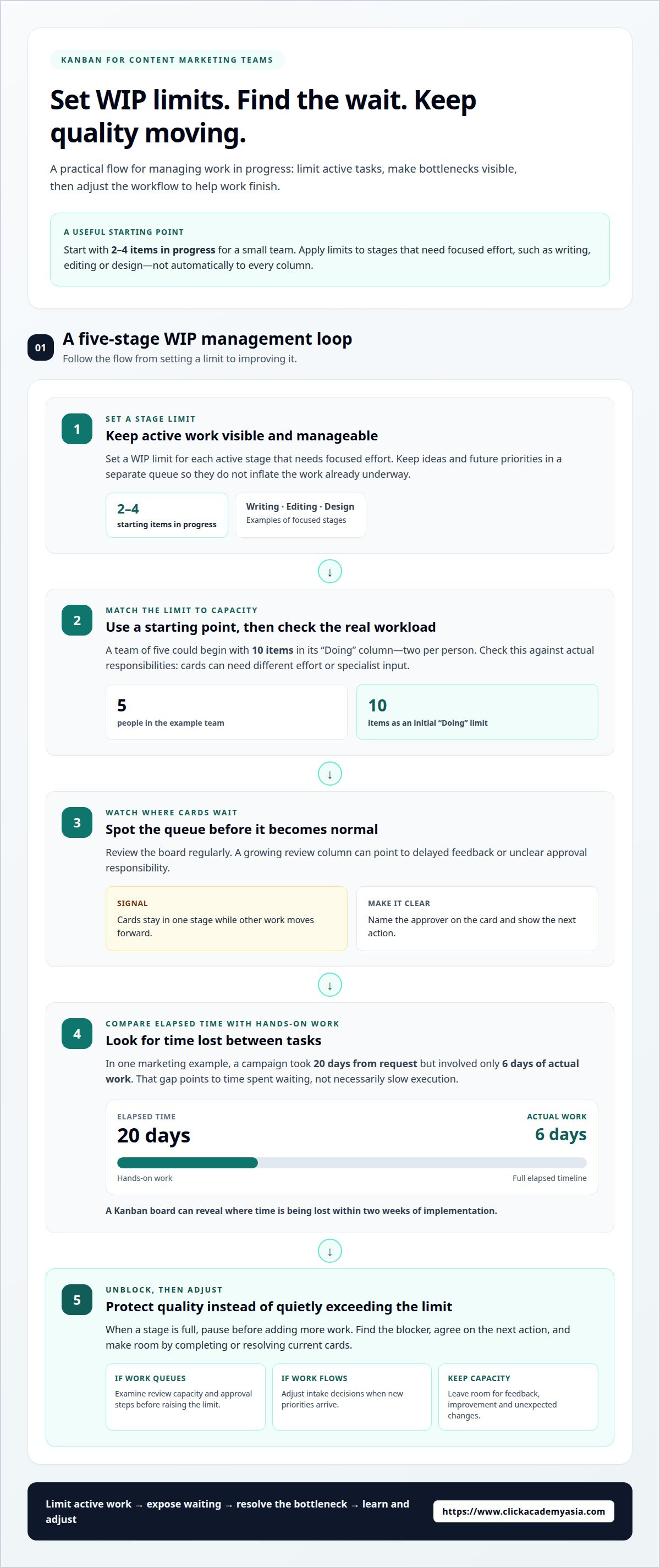
Set Limits for Each Workflow StageSet a work-in-progress limit for each active stage, such as writing, editing or design. A small team can start with 2-4 items in progress, then adjust as its capacity becomes clearer. Keep ideas and future priorities in a separate queue, so they don’t inflate the number of tasks already underway.Kanban for content marketing teams works best when limits apply to stages requiring focused effort, rather than automatically to every column. For example, a team of five could begin with 10 items in its “Doing” column, allowing two items per person. Check that workload against actual responsibilities, since each card may require different effort or specialist input.
Monitor Progress and BottlenecksReview the board regularly and look for cards that stay in one stage while other work moves forward. A growing review column can signal delayed feedback or unclear approval responsibilities. Name the approver on each relevant card and make the next action visible, so the team can distinguish active work from work that is waiting.Compare elapsed time with hands-on work to locate bottlenecks. In one marketing example, a campaign took 20 days from request but involved only 6 days of actual work. That gap points to time spent waiting, not necessarily slow execution. A Kanban board can reveal where time is being lost within two weeks of implementation.Use reviews to balance priorities against capacity rather than filling every available slot. Consider who has the skills and support to own each task. A diverse team can bring different perspectives to content decisions, while assigning stretch work thoughtfully can support career growth without giving one person too many active cards.
Reduce Work in Progress to Protect QualityWhen tasks pile up, pause before adding more work to the busiest stage. Ask whether the team can finish or unblock existing cards first. Lowering work in progress can shorten completion time and support better-quality output, because people spend less effort switching between unfinished drafts, design requests and reviews.Don’t treat a full “In Progress” column as a reason to quietly exceed its limit. Identify the blocker, agree on the next action and make room by completing or resolving current work. Keep some capacity available for feedback and improvement. A team at full capacity has little room to handle unexpected changes or protect quality.Set work-in-progress limits to match your team’s capacity and workflow. If editing regularly becomes a queue, examine review capacity and approval steps before raising the limit. If work moves smoothly but new priorities arrive, adjust intake decisions instead. This keeps project management focused on delivery and learning, not simply on how many tasks the team has started.
What is Kanban in Project Management?
Kanban makes work visible on boards, then helps teams manage a continuous flow from request to delivery. In Singapore, adapt that flow for language versions, public holiday schedules and compliance reviews by making each requirement visible in the workflow.
Make the workflow visible. Map the stages a content task passes through, such as planning, writing, editing, approval and publishing. Define each stage clearly so people can see whether a card needs action or is waiting. A social post, for example, might move from draft to review, scheduled and published.Use the board to show the current state of work, not every detail of the project plan. Add a card when a task enters the workflow, and update it as its owner or status changes. This visual project management approach helps colleagues understand progress without relying on separate status messages.
Keep priorities flexible. Unlike fixed-length sprint planning, Kanban supports continuous flow, so a team can change priorities as needs shift. Record incoming requests on the board, then decide what should move forward based on urgency, capacity and work already underway. This keeps a new request from quietly disrupting existing commitments.For Singapore campaigns, add the required language version and planned publication date to each relevant card. Mark public holidays on the team calendar and account for reduced availability when agreeing delivery dates. Include a compliance review stage where needed, with a named owner and clear next action, rather than leaving approval expectations in chat.
Build feedback into delivery. Set a regular review point to discuss what moved, what waited and what should change. Use feedback from readers, stakeholders or campaign results to identify opportunities to improve. For example, if social posts repeatedly wait for copy approval, clarify who reviews them and what feedback they should provide.Keep the discussion focused on the workflow, not blame. Ask whether a stage has unclear entry criteria, missing information or too many hand-offs. Record one practical improvement on the board, then see whether it helps. This makes improvement continuous and grounded in the team’s real work.
Deliver in useful increments. Complete and publish suitable pieces as they are ready instead of holding all content for one large release. A team might publish approved articles while a related video is still being edited. Smaller releases create earlier opportunities to learn from performance and stakeholder feedback.Use WIP limits alongside clear completion criteria to keep work flowing. If a campaign has dependencies that require a broader plan, track those separately while the board manages ongoing tasks. Teams looking to strengthen their planning and execution can build practical skills through ClickAcademy Asia Sales/Marketing courses, as well as deepen their expertise via ClickAcademy Asia Content Marketing Strategy programs.
Kanban’s origins and principles
Kanban’s history offers a practical lesson for content work: make demand visible, then coordinate action around it. Use these steps to apply that principle to your team’s daily workflow.
Understand the original signal. Toyota developed Kanban in the 1940s, using cards to signal that more parts were needed on a production line. The card communicated a specific need at the point of work. For a content team, apply the same idea by making each request visible, with enough detail for the next person to act.For example, a card for a campaign article can identify its brief, owner and required next step. It is more than a reminder: it signals that a defined piece of work needs attention, helping team members coordinate without relying on scattered messages.
Make work visible before changing the process. Create a Kanban board that reflects how content moves through your team. A blog article might pass through briefing, drafting, editing, approval and publication. Label each stage clearly, then move the card only when the work has genuinely progressed.This visibility helps the team distinguish requests from active tasks. If an article lacks a brief, keep it in preparation rather than treating it as ready for a writer. That simple distinction makes the workflow easier to understand and exposes missing information before production begins.
Use cards to clarify responsibility. Give every card a concrete deliverable, an accountable owner and a next action. A campaign card labelled “prepare launch content” may hide several different tasks. Separate the article, social posts and email copy when each needs its own owner or approval.Keep each deliverable small enough to follow through the board. When a card waits for stakeholder feedback, record the decision needed. That makes the signal useful to both the person doing the work and the colleague responsible for moving it forward.
Adapt the principles to marketing. David J. Anderson articulated Kanban’s application to software development in 2013 in his book Kanban: Successful Evolutionary Change for Your Technology Business. For a marketing team, the practical lesson is to improve the existing workflow incrementally, rather than assume every campaign needs a new process.Start with one recurring activity, such as editorial production. Observe where cards pause, then make one adjustment, such as clarifying the approval step. Keep the board aligned with actual work, and change it as the team’s needs evolve.
Reflect on how the board is working. Review completed cards and waiting tasks together, then identify one improvement to test. For example, if campaign assets repeatedly return from approval, clarify the review criteria before the next batch enters that stage.Keep the change small enough to assess. Team members can discuss whether the new criteria reduce avoidable revisions, then retain or revise the process. This turns the board into a shared learning tool, not just a display of tasks.
How do you know what your first Kanban board should look like?
Build the first board around one recurring workflow, such as producing blog articles, and adjust it as real tasks reveal gaps.
Set Intake and PrioritiesChoose one work type, then define how a request enters the board. For a blog article, require a brief, an owner and a deadline before moving the task into “Ready”. This prevents incomplete requests from appearing ready for production and gives team members a consistent way to handle new work.Use the board as the single source of truth: add requests there before discussing them elsewhere. Give each card a clear deliverable, such as “draft product guide”, rather than a broad label like “content”. Break work into pieces that can be completed in a few days, keeping progress visible and priorities easier to compare.Set a simple intake rule for urgent requests. For example, a time-sensitive campaign can take priority when its launch date is close, but the team should record which planned task moves back. That trade-off makes changing priorities explicit instead of creating hidden delays across the board.Keep the first board focused. A typical content workflow might use “Ready”, “In Progress” and “Done”, with more detailed stages added only when needed. Define what “Ready” and “Done” mean for the chosen work type. For an article, “Done” could mean approved and published, not merely drafted.
Use Prioritisation to Improve PredictabilityAgree how the team will rank ready tasks, then apply that method consistently. Compare deadlines, campaign importance and dependencies before pulling work forward. If an event is taking place in the coming 1-2 weeks, its related content may need earlier attention than an evergreen article with no fixed launch date.Keep the ranking visible on the board through card order or a priority label. Avoid marking every request urgent, because that removes the distinction people need to decide what to do next. When a new campaign changes the order, update the affected cards and show which previous priority has shifted.Use completed work to refine expectations. If several articles wait for the same approval, include that stage in the workflow rather than treating the delay as unexpected. Once the board reflects typical hand-offs, the team can compare upcoming commitments with current work and make more predictable choices.Review the intake and ranking rules together when they no longer match actual work. For example, if social posts and long-form articles compete for the same editor, distinguish their urgency from the effort they require. A clear rule helps the team protect campaign deadlines without losing sight of ongoing content.
Swimlanes for organising marketing work
Add swimlanes when columns alone don’t show which audience, campaign or workstream each card supports. Keep the board tied to business priorities, not just task status.
Manage Continuous Work and Replenish the QueueCreate swimlanes that reflect the marketing team’s ongoing work, such as blog, social media and print. These lanes help colleagues see how different content formats move through shared columns, from planning to publication. For B2B work, a campaign lane can connect an article, social posts and supporting assets to the same audience or objective.Replenish the work queue by reviewing ready tasks and choosing what the team can take on next. Keep new requests visible, but don’t move every request into active work. Use Kanban principles such as visualising work and managing flow to balance campaign commitments with ongoing tasks, like editorial updates or scheduled social content.Assign one accountable owner to each card, even when several team members contribute. The owner coordinates progress; writers, designers and editors complete their assigned work, while the relevant approver makes the required decision. This clarifies hand-offs without creating unnecessary roles.
Track Work Beyond Individual TasksRepresent recurring work that uses meaningful team capacity, not just campaign deliverables. For example, a recurring performance report, editorial planning session or coordination task can have its own card if it takes more than an hour a week. Give it an owner and status, so its effort doesn’t disappear behind visible production tasks.Use a separate lane for operational or improvement work if it competes with content delivery. During a board review, check whether campaign work is delaying those cards. If the lane grows, discuss what to pause, delegate or schedule differently instead of letting hidden commitments accumulate.Keep lanes useful by grouping work around a distinction that affects decisions, such as priority, department or content format. Avoid adding a lane for every stakeholder or minor task type. Too many lanes make the board harder to scan and can obscure work that needs attention.
Coordinate Calendars, Campaigns, and DeadlinesConnect each calendar item to a card showing its campaign, deadline, owner and current status. This lets the team see whether a planned post is still in drafting, awaiting approval or ready to publish. For larger campaigns with dependencies, use the board for ongoing tasks alongside a separate project plan.Trello, Asana, Monday.com and Jira can be assessed against the same needs: clear workflow columns, useful calendar planning, task ownership and visibility of dependencies. Compare them using a small, real workflow rather than assuming one is best for every content team. Choose the tool your team can maintain consistently.To strengthen the strategy behind your lanes and priorities, explore [Internal Link: ClickAcademy Asia Content Marketing Strategy].
ClickAcademy Asia: WSQ Content Marketing Strategy
ClickAcademy Asia offers WSQ Content Marketing Strategy for professionals who want to strengthen the thinking behind their content workflow. Consider this training when your board shows that tasks are moving, but objectives, audience priorities or publishing plans need clearer direction.
A clear strategy connects day-to-day content decisions with business goals. It can guide how your team sets objectives, defines standards, allocates resources and plans its publishing schedule. With those foundations in place, your Kanban board can organise execution while keeping the purpose of each content item visible.
If you’re ready to build stronger strategic foundations for your content work, contact ClickAcademy Asia to discuss WSQ Content Marketing Strategy.
Turn your board into a stronger marketing practice
A board can reveal more than task status. Over time, it can show where your team needs stronger skills, whether in setting strategy, shaping content or improving search performance. Use those patterns to guide professional development priorities, so learning responds to real work rather than abstract goals.
For professionals ready to build that capability, ClickAcademy Asia offers WSQ Digital Marketing Strategy & Planning, WSQ Content Marketing Strategy and WSQ Search Engine Optimisation (SEO). A thoughtful approach to kanban for content marketing teams can connect practical workflow decisions with the broader marketing knowledge needed to sustain them.
Contact ClickAcademy Asia to discuss WSQ-funded training tracks, and equip your team with skills for its next learning step.
Frequently Asked Questions
How does Kanban work?
Kanban works by showing tasks as cards and moving them through the stages where work happens. For example, a campaign email card can move from brief preparation to copywriting, review and release. Each move updates the team’s shared view, making hand-offs and waiting points easier to spot. Agree on who updates cards and what each status means, so the board remains a reliable picture of current work.
Kanban or Scrum: which should you choose?
Choose Kanban for work that arrives continuously and needs priorities to change as requests come in. Choose Scrum when the team benefits from planning a defined batch of work for a fixed-length sprint, usually 1-4 weeks. A content team handling ongoing SEO updates may prefer Kanban, while a coordinated campaign with a set scope may benefit from sprint planning. The deciding factor is how work enters and changes.
What should be on a Kanban card?
A useful Kanban card identifies the deliverable, accountable owner, current status and next action. Add a deadline when timing matters, along with the brief or reference material needed to begin. For a landing page, the card might name the page, copy owner, approval contact and outstanding input. Keep details focused on helping someone act; put lengthy background in a linked document rather than turning the card into a full project file.
How do you implement Kanban in a marketing team?
Start with one recurring workflow, such as producing email newsletters, and map its real hand-offs with the people doing the work. Create a shared board, agree on what qualifies as ready, then assign card owners and someone to facilitate regular reviews. Run the workflow, note where cards wait and adjust one rule at a time. Expand only when the first workflow is useful, to avoid building a board nobody maintains.
What is a WIP limit and why does it matter?
A work-in-progress (WIP) limit caps how many cards can occupy an active workflow stage at once. It matters because starting another task can conceal delays in work already underway. If a design stage is at its limit, the team should help move existing designs forward or resolve a blocker before accepting another task. Treat the limit as a prompt to discuss capacity, not as a score or a reason to hide incoming requests.
What’s the difference between a Kanban board and a task list?
A task list records work, while a Kanban board also shows each task’s position in a workflow. A list may show that a webinar page needs editing; a board reveals whether editing has started, is awaiting feedback or is ready to publish. That context helps colleagues coordinate hand-offs and spot queues. Use a list for a simple personal checklist, and a board when shared progress and workflow visibility matter.
When is Kanban not a good solution?
Kanban may not be sufficient as the only planning method for a large campaign with many dependencies, fixed milestones and coordinated deliverables. A board can show ongoing tasks, but a separate project plan may better explain sequencing, decision points and how one team’s output affects another’s. A board can also be a poor fit when work is rarely updated or the process has no agreed stages. Address those conditions before relying on it.
How should content marketing teams structure Kanban columns and workflow stages?
Structure columns around the actual stages content must pass through, not job titles or departments. A podcast episode, for instance, might need planning, recording, editing, approval and release. Add a waiting state if external feedback regularly pauses delivery, and define completion as content that is genuinely published or distributed. Keep the board readable; split a stage only when its cards need different actions or owners.



Comments