
GA4 Course for Marketers in Singapore: Fees and Funding

A dashboard is only useful when you can trust what it measures. A GA4 course for marketers should take you from account setup and event tracking to using reports for better marketing decisions. In Singapore, fees depend on the course and learner’s funding eligibility; Singapore citizens aged at least 25 may use SkillsFuture Credits on top of existing subsidies.
It’s understandable to want practical GA4 skills without losing sight of the cost. This guide explains what the training covers, how to set up and use GA4, and how Singapore subsidies and funding offsets may apply. You’ll also see which factors shape the fee, so you can assess the learning and funding route that fits your role or team.
Table of Contents
GA4 account setup and platform navigation
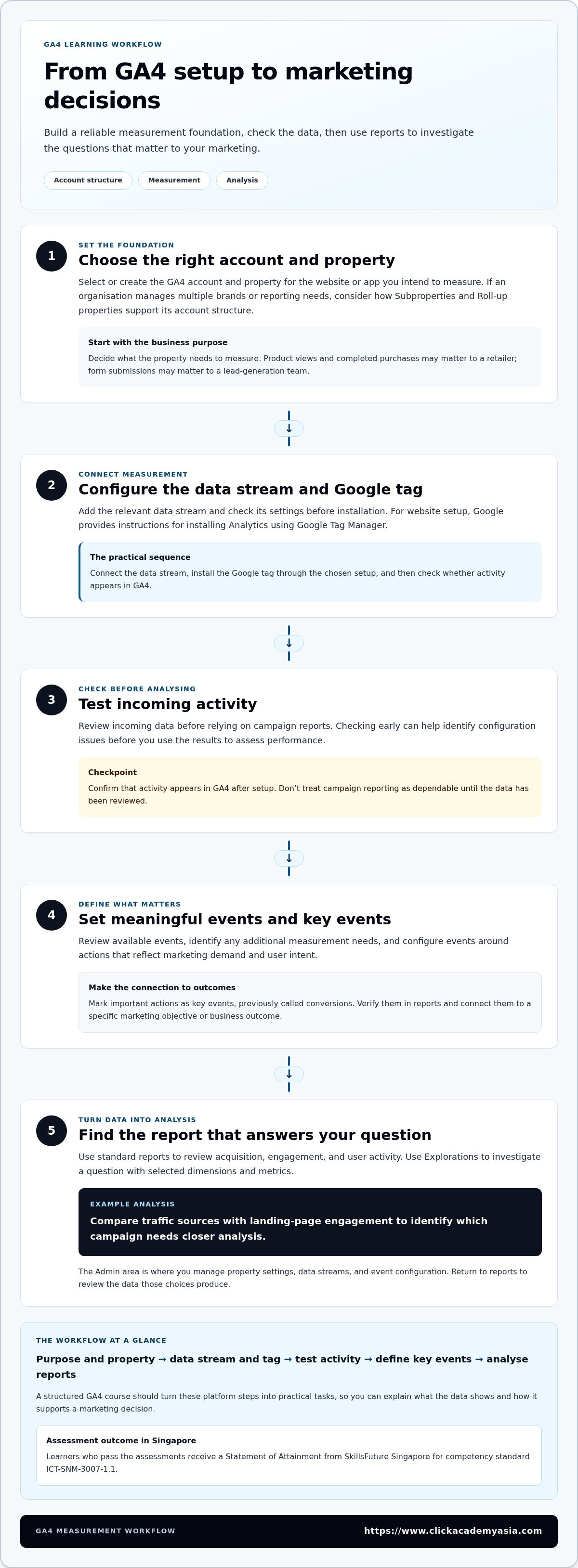
A useful GA4 setup connects account structure, property settings and measurement to specific marketing decisions. A GA4 course for marketers should teach you to build that foundation, then read the resulting analytics data.
In Singapore, learners who pass the assessments receive a Statement of Attainment from SkillsFuture Singapore for competency standard ICT-SNM-3007-1.1. Employers can assess this alongside practical evidence, such as configuring an event and explaining its report.
GA4 Platform Navigation
Start by locating the account and property selector, then find the reports that answer your business question. Standard reports show acquisition, engagement and user activity. Explorations let you investigate a question using selected dimensions and metrics. For example, compare traffic sources with landing-page engagement to identify which campaign needs closer analysis.
Good navigation also means understanding where configuration choices live. Use the Admin area to manage property settings, data streams and event configuration, then return to reports to review the resulting data. A structured course should guide you through these areas with a practical task, rather than treating the interface as a list of buttons to memorise.
Property Setup and Configuration
Build your measurement foundation by creating or selecting the correct GA4 account, then setting up a property for the website or app you intend to measure. Add the relevant data stream and check its settings before installation. If one organisation manages multiple brands or reporting needs, understand how Subproperties and Roll-up properties can support account structure.
Before collecting analytics data, define the property’s business purpose. A retailer might measure product views and completed purchases; a lead-generation team might focus on form submissions. These goals help determine which events matter and distinguish meaningful actions from routine page activity.
For website setup, Google provides instructions for installing Analytics using Google Tag Manager. The practical sequence is to connect the data stream, install the Google tag through the chosen setup, and test whether activity appears in GA4. Reviewing incoming data before relying on campaign reports helps identify configuration issues early.
Configure events around actions that reflect marketing demand and user intent. Review available events, identify any additional measurement needs and mark important actions as key events, previously called conversions. A course should show you how to verify events in reports and connect them to business outcomes, not just how to switch on tracking.
Use this setup checklist:
Choose the correct account and property for the website or app.
Configure the data stream and install the Google tag.
Test incoming activity before analysing campaign performance.
Define key events that match a specific marketing objective.
These fundamentals turn platform concepts into a repeatable, data-driven workflow. With measurement set up clearly, you can use advanced analytics features with greater confidence in the decisions your reports support.
Singapore course fees, subsidies and funding offsets
In Singapore, the amount payable depends on the course, learner eligibility and sponsorship arrangement. SkillsFuture subsidies and other funding schemes can reduce eligible costs, but each applies under its own criteria.
Which GA4 courses are best for marketing professionals? Choose training that matches your work: fundamentals for reporting and setup, or advanced analytics for attribution and optimisation. The right subject is the one that helps you apply GA4 to current campaign decisions.
How do GA4 courses compare with Google Skillshop training? Skillshop is a platform-based learning route, while structured courses can provide guided practice and assessment. Compare the curriculum, learning format and credential against the skills your role requires.
Are there free GA4 courses and certifications? Self-study materials and funded classroom training are different routes, and a subsidy does not mean a course is free. Learners who pass prescribed assessments for the relevant Singapore-funded course can receive a Statement of Attainment for its stated competency standard.
How long does a GA4 course take and what are the prerequisites? Course duration varies: listed programmes include 17-hour, 14-hour and 16-hour options. Entry criteria can include English-language proficiency at WPLN level 6; individual-sponsored trainees must be at least 21 years old.
For eligible learners, the funding route depends on citizenship or residency, age, and whether an employer sponsors the training. One listed route provides 50% baseline funding for eligible Singapore citizens aged 21 and above, and eligible PR or LTVP+ holders. Singapore citizens aged 40 and above may receive 70% total funding through baseline funding and MCES.
Employer support can change the calculation. According to SkillsFuture Singapore and Enterprise Singapore, employers can use SkillsFuture Enterprise Credit of S$10,000 to offset up to 90% of out-of-pocket course fees on top of existing schemes. This is an employer credit, separate from an individual learner’s SkillsFuture Credits.
Before enrolling, identify the course reference, funding category and sponsorship type. The listed course cohorts include 5 and 6 November 2026, and 8 and 9 December 2026. For a company-sponsored learner, check whether the employer qualifies for SME support and whether SkillsFuture Enterprise Credit applies.
Individual funding: eligibility depends on the learner’s profile and course.
Employer funding: sponsorship and available enterprise schemes shape the payable amount.
Course selection: compare the curriculum and assessment with the skills needed at work.
The course fee depends on the case and is given after a quote request; the key factors are course selection, learner eligibility, sponsorship and applicable funding. Passing all prescribed tests or assessments and attaining 100% competency are stated funding eligibility criteria for Singapore SkillsFuture-funded courses.
Why Learn Google Analytics 4 (GA4) in Singapore?
Google Analytics helps website and app owners understand customer activity, and it’s used by millions worldwide. For Singapore marketing teams, reliable tracking turns campaign clicks into evidence about what visitors do next. A working setup depends on more than adding code: the Google tag, Google Tag Manager and connected platforms must support the same measurement goals.
Google provides instructions for installing Analytics on a website using Google Tag Manager. A practical implementation starts by selecting the correct GA4 web data stream, then adding the Google tag through the chosen tag-management setup. The tag sends website activity to the property, where marketers can analyse events and campaign performance.
Implement and Validate Google Tag Manager
In Google Tag Manager, create or open the container for the website, then configure the Google tag with the GA4 measurement ID. Publish the container only after reviewing its changes. Use the preview and debugging workflow to check that the tag fires on relevant pages, such as a campaign landing page and a product page.
Validation matters because a visible tag isn’t proof that useful analytics data is arriving. Open GA4 reporting tools and confirm that test activity appears against the intended property. Then test an important action, such as a form submission, and check that the event name and parameters match the reporting plan. This sequence helps catch a wrong measurement ID, duplicate tagging or an event that never fires.
Connect Google Ads and Search Console
Linking Google Ads with GA4 gives marketers a way to examine advertising activity alongside website engagement. In GA4 Admin, open product links and select Google Ads links. Choose the relevant account, review the link settings, and confirm the connection. Then use campaign reporting to assess what visitors do after arriving from an advert.
For organic search analysis, connect Search Console through GA4’s product links. Select the Search Console property that corresponds to the website’s GA4 web stream, then complete the linking steps. The combined reporting can help teams compare organic search queries and landing-page activity with on-site behaviour. Check that the selected properties refer to the same website before interpreting results.
For example, a retailer could use Google Ads reporting to compare paid campaign visits with product-page engagement. Search Console data could add context about organic queries leading visitors to those pages. Integrations add useful context to your measurement plan, but they do not replace good event design.
Install: configure the Google tag through Google Tag Manager.
Validate: test page activity and key events in GA4.
Connect: link relevant Google Ads and Search Console properties.
Review: use campaign and search data to guide marketing decisions.
Learning these steps helps marketers assess how paid and organic channels contribute to customer activity. A course with implementation practice can help you build a repeatable setup and use Google Analytics reports to make more informed campaign decisions.
Audiences, segments, filters, and comparisons
GA4 audiences and segments help marketers move beyond overall traffic totals. They let you examine groups by behaviour, source or campaign, then interpret how those groups interact with your site. For a Singapore digital marketing team, the useful question is whether a campaign attracts visitors who take valuable actions, not simply whether it generates visits.
Build audiences around meaningful behaviour
An audience groups users who meet conditions you define in GA4. For example, create an audience of visitors who viewed a product page but didn’t complete a purchase. You could also group users by traffic source or a specific event. Clear audience definitions make reports easier to interpret and can support relevant follow-up campaigns when advertising integrations are configured.
Keep the purpose specific. A team promoting a training programme might build an audience of visitors who viewed course details, then compare its behaviour with that of all site visitors. Avoid combining unrelated actions, such as a page view and a support enquiry, unless both inform the same marketing decision. A focused audience gives campaign planning a clearer evidence base.
Use segments to investigate behaviour
Segments let you isolate subsets of analytics data during exploration. GA4 supports user, session and event segments, each answering a different question. A user segment can examine people who visited from an email campaign; a session segment can focus on visits from paid search; an event segment can isolate users who triggered a form-submission event.
Compare segments against a clear baseline. For example, review paid-search sessions alongside organic-search sessions, then examine engagement and key events. This reveals differences without assuming one channel caused them. Keep the date range and dimensions consistent so the comparison reflects channel behaviour, not mismatched reporting choices.
Apply filters and report comparisons carefully
GA4 data filters help manage incoming data, such as internal traffic. Define the relevant traffic first, then test the filter before activating it. A filter affects the data collected under its settings, so changing it deserves care. For routine analysis, use report comparisons to view groups side by side without changing the underlying property data.
In a report, compare users from a campaign with users from other traffic sources. Add a relevant dimension, such as session source or device category, and inspect engagement and key events. Don’t treat a comparison as proof of marketing ROI. Combine GA4 outcomes with campaign costs and business revenue data before assessing return.
Define: connect each audience to a campaign decision.
Segment: choose user, session or event scope to match your question.
Filter: test data rules before applying them.
Interpret: compare consistent metrics and include cost data when assessing ROI.
Turn audience analysis into a practical learning loop: set a hypothesis, compare relevant groups and adjust the next campaign. Document audience conditions and reporting choices so colleagues can reproduce the analysis and understand why the programme changed.
Engagement, events and conversion tracking
GA4 event tracking records actions, not just page views. A marketer can use events to understand whether a visitor watched a product demonstration, downloaded a guide or submitted an enquiry. The value comes from choosing actions that reflect real interest, then using those signals to assess campaign performance.
Begin with a measurement plan. Write down the business objective, the user action that indicates progress and the event name needed in GA4. For a lead-generation campaign, the objective might be qualified enquiries; the action could be a completed form. This keeps event design connected to business outcomes instead of collecting activity without a clear purpose.
Choose and configure useful events
GA4 collects some events automatically when measurement is configured. Marketers can also create or configure events for actions that matter to their website. For example, an event could capture a brochure download or a click to contact the sales team. Use consistent names, so reports remain understandable across campaigns and teams.
Event parameters add context to an action. A form-submission event might include a form name or page location, helping analysts distinguish a product enquiry from a newsletter registration. Decide which details support a reporting decision, then configure and test them. Avoid collecting unnecessary information, and use consistent event names across the site.
Mark priority actions as key events
In GA4, mark the events that represent important business outcomes as key events, formerly called conversions. A completed booking may be a key event, while a video play may indicate engagement without representing a completed sale. This distinction helps teams report meaningful outcomes without treating every interaction as equally valuable.
After configuration, test the action on the website and review its event data in GA4. Check that the event fires once for the intended action and carries the expected parameters. Then use reports to compare key events by campaign, landing page or traffic source. If a campaign attracts visits but few enquiries, investigate the landing-page experience and audience fit.
Plan: connect each event to a marketing objective.
Name: use clear, consistent event names.
Test: complete the action and inspect incoming event data.
Interpret: assess key events alongside campaign context.
For example, an education provider could track course-detail views, enquiry submissions and completed registrations as separate actions. Comparing these events helps marketers see where prospective learners leave the journey and gives teams a practical basis for improving campaign content and landing pages.
Develop these learning and tracking practices through a comprehensive ga4 course for marketers at ClickAcademy Asia, using realistic marketing scenarios to make measurement a working part of campaign optimisation.
ClickAcademy Asia: WSQ Digital Marketing Strategy & Planning
ClickAcademy Asia’s WSQ Digital Marketing Strategy & Planning is a natural next step when you want to connect analytics insights with campaign decisions. Use GA4 findings to assess audience behaviour, identify measurement gaps and inform your marketing priorities. The programme focuses on strategy and planning, complementing the practical analytics skills covered in this guide.
Turn reporting into action by using it to strengthen decisions about channels, campaign objectives and performance measurement. To build skills across related disciplines, ClickAcademy Asia offers WSQ Content Marketing Strategy, WSQ Search Engine Optimization (SEO) and WSQ Search Engine Marketing (SEM).
To explore training options, visit ClickAcademy Asia’s website.
Turn measurement into your next marketing advantage
Make your next step specific: choose one campaign decision, identify the evidence your team needs and agree who will review the result. Record the action taken and what the next reporting cycle reveals. This routine helps make analytics practice a repeatable part of marketing planning.
For team leaders, the opportunity is to build shared capability, not just individual confidence. ClickAcademy Asia offers WSQ-funded training for teams looking to strengthen planning and measurement skills. Explore [Internal Link: ClickAcademy Asia WSQ-funded training tracks] as you plan your team’s development.
Start with one measurable business objective, then give your team the learning and space to act on it. Consistent practice can help make informed marketing decisions part of how your organisation works.
Frequently Asked Questions
What This Course Is About?
A GA4 course teaches marketers to turn website and app activity into useful evidence for decisions. Rather than treating analytics as a reporting task alone, learners connect measurement to a business question, such as which landing page supports more enquiries. Practical learning should help you interpret reports, explain findings to colleagues and identify what to investigate next.
Who should attend?
GA4 training suits marketing professionals who use performance data to plan or assess campaigns, including digital marketers, content specialists and marketing managers. It can also help business owners and team leads who need to interpret reports or brief colleagues. If your role involves campaign planning, reporting or website performance, bring a current marketing question to help connect the concepts with your work.
What does a GA4 course for marketers cover?
A GA4 course for marketers typically covers account and property fundamentals, reports, events, key events, audiences and campaign analysis. Look for practical exercises that ask you to interpret a report and explain what action it suggests. For example, you might investigate why visitors arrive at a campaign page but leave before completing an enquiry, then identify which data could clarify the pattern.
How much do GA4 marketing courses cost in Singapore?
Course fees in Singapore vary by programme, learner eligibility and whether training is self-sponsored or employer-sponsored. Compare the full fee with the amount payable after applicable subsidies, and note whether GST is included in the quoted figure. Funding can change the out-of-pocket amount, so assess the relevant learner and employer eligibility rules rather than comparing headline fees alone.
Are there GA4 courses in Singapore with in-person or live online classes?
ClickAcademy Asia offers flexible delivery formats, including onsite, online and hybrid training. Choose the format that suits how you learn and apply the material. Before enrolling, review the course page for its delivery mode and schedule, then consider whether your team can attend and practise together.
What marketing skills can you learn with GA4, including campaign attribution and reporting?
GA4 can help marketers assess traffic sources, landing-page engagement and user actions, then use those insights to refine campaign planning. Attribution reporting helps examine how channels contribute along a customer journey, rather than judging activity only by the final interaction. For example, compare paid search and email touchpoints with registration activity, then discuss how the evidence should inform budget or creative decisions.
How can marketers use GA4 to set up events, conversions, and audiences?
Start with a marketing objective, then identify the user action that signals progress, such as completing a registration form. Configure an event to record that action, mark priority outcomes as key events and build an audience using relevant behaviour. Check that the collected data reflects the intended action before using it to assess campaigns or guide follow-up.
What should marketers check before choosing a GA4 course?
Check that the curriculum matches your current skill level and covers the tasks you need, such as analysing acquisition or explaining campaign results. Review whether the course includes hands-on practice, assessment, delivery format and funding information relevant to your circumstances. Also consider whether the learning outcomes will help you apply GA4 to a real work objective, rather than only follow demonstrations.


Comments