
Advanced Technical SEO Audit 2026: Singapore Guide

What if the longest technical SEO issue list is hiding the few fixes that matter most? For Singapore businesses, an advanced technical seo audit checklist 2026 should do more than collect warnings. It should help your team decide what to fix first and verify whether each change worked.
Audits can feel overwhelming when tools flag crawl errors, indexation gaps, JavaScript rendering problems and slow page experiences without showing which issues deserve attention. This guide gives you a practical process for investigating those findings, turning them into developer-ready tasks and measuring the results.
You’ll learn how to assess crawling, indexing, rendering and performance, then prioritise issues according to their likely impact and implementation effort. You’ll also see how to validate changes consistently and document what changed. With a repeatable audit process and ongoing SEO skills development, your team can explain technical recommendations clearly and connect them to wider marketing goals.
Table of Contents
What an Advanced Technical SEO Audit Checklist Covers for Singapore Websites
Crawlability and Indexation Checklist: Help Search Engines Find the Right Pages
Rendering, Core Web Vitals and Structured Data: Test What Search Engines and Users Experience
Turn Technical SEO Audit Findings into a Prioritised Fix List
Build a Repeatable Technical SEO Audit Practice in Singapore
What an Advanced Technical SEO Audit Checklist Covers for Singapore Websites
A strong content strategy can still underperform if search engines can’t access key pages, interpret their content or deliver them reliably to users. The advanced technical seo audit checklist 2026 treats these as connected parts of search readiness. It helps Singapore teams move beyond collecting tool warnings and investigate what may be limiting visibility or usability.
A technical audit focuses on a site’s accessibility, interpretation and performance. It complements, rather than replaces, keyword research, content quality reviews and backlink analysis. Those activities examine what to target, how well content meets a need and how the site earns external authority. Technical SEO supports them by helping important pages become easier to discover, understand and use, a foundation also covered in [External Link: Search engine optimisation overview].
This video offers a broad introduction to SEO and technical audit concepts:
For SEO, marketing and development teams in Singapore, audit scope matters. A corporate site, online shop and site with multiple language versions can have different templates and user journeys. Account for those differences rather than treating every URL as if it serves the same purpose.
What makes a technical SEO audit advanced?
An advanced review investigates causes, affected templates and scale, not just the label attached to a warning. If a crawler flags a group of pages, check whether they share a template, whether the URLs matter to users or search visibility, and whether you can reproduce the issue.
Separate confirmed defects from recommendations that need context. A tool can identify a pattern, but your team needs to assess its relevance against the site’s architecture and goals. Record evidence, likely impact and an owner for each finding so it becomes a practical task rather than an unassigned observation.
Set an audit scope before running checks
Start with a short scope document. List the site sections and key templates to review, the target markets and business-critical journeys, such as finding a product or submitting an enquiry. Note what is in scope and any limitations, including pages or environments your team can’t access.
Arrange access to Google Search Console, analytics and crawling tools before analysis begins. Record the audit period and baseline measures you’ll use for comparison, such as organic landing-page activity or relevant technical measures. A shared baseline helps SEO, analytics and development stakeholders assess findings and verify changes consistently.
Crawlability and Indexation Checklist: Help Search Engines Find the Right Pages
A page can exist in your CMS and still be difficult for search engines to discover or interpret. Use the advanced technical seo audit checklist 2026 to compare the URLs your site exposes with the pages your business intends to make available in search. The goal isn’t to get every URL indexed. It’s to help search engines discover the right pages and identify unwanted ones.
Start with representative URLs from each important section and template, such as category pages, product details, service pages and articles. Compare the URLs a crawler discovers with your planned site architecture. An unexpected gap may point to weak internal linking, a blocked path or a page with no useful route from the rest of the site.
Check crawl paths, robots.txt and XML sitemaps
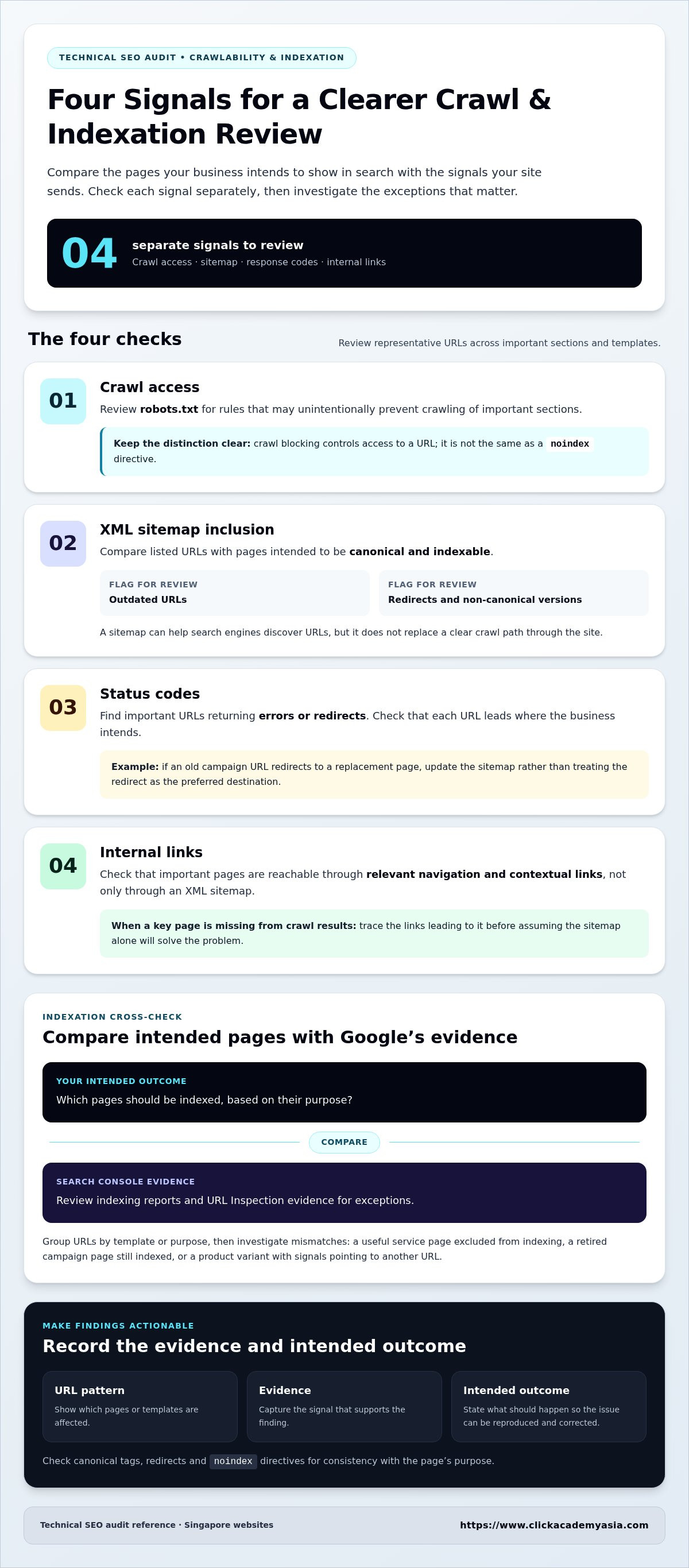
Review crawl access, sitemap inclusion, response codes and internal links as separate signals. Important pages should be reachable through relevant navigation and contextual links, not only through an XML sitemap. A sitemap can help search engines discover URLs, but it doesn’t replace a clear crawl path through the site.
Robots.txt: Check whether rules unintentionally prevent crawling of important sections. Crawl blocking controls access to a URL. It isn’t the same as a noindex directive.
XML sitemaps: Compare listed URLs with pages intended to be canonical and indexable. Flag outdated URLs, redirects and non-canonical versions for review.
Status codes and links: Find important URLs returning errors or redirects, and check whether internal links point to the intended final destination.
For example, if a sitemap lists an old campaign URL that redirects to a replacement page, update the sitemap and relevant internal links rather than treating the redirect as the preferred destination. If a key category page is missing from crawl results, trace the links leading to it before assuming the sitemap alone will solve the problem.
Diagnose indexation and canonical signals
Compare the pages your team expects to be indexed with Google Search Console’s indexing reports and URL Inspection evidence. Group URLs by template or purpose, then investigate exceptions: a useful service page excluded from indexing, a retired campaign page still indexed, or a product variant with signals pointing to another URL.
Check canonical tags, redirects and noindex directives for consistency. A page that redirects shouldn’t also be treated as the preferred canonical destination, while a deliberate noindex should match the page’s purpose. Record the affected URL pattern, evidence and intended outcome so a developer can reproduce the issue and make a focused correction.
Crawlability does not guarantee indexation: a search engine may be able to access a URL without choosing to include it in its index.
When working with multiple markets, assess language or regional sections separately if their URL structures and internal links differ. Build SEO judgement alongside technical know-how through [Internal Link: ClickAcademy Asia SEO training], helping your team turn audit findings into clear actions for development and marketing.
Rendering, Core Web Vitals and Structured Data: Test What Search Engines and Users Experience
A page can load in a browser and still fail to expose its important content consistently to search engines or users. The advanced technical seo audit checklist 2026 should test what a page delivers after rendering, how it performs in real visits and whether its structured data accurately describes visible content.
Compare lab diagnostics with field data, but don’t treat them as interchangeable. Lab tests offer a repeatable, controlled view that can help isolate resource or execution bottlenecks. Field data reflects real user experiences across devices and network conditions, but doesn’t explain the cause on its own. Use both where available, and record test conditions so later checks are comparable.
Audit JavaScript rendering and mobile experience
For representative page templates, compare the raw HTML with the rendered output. Confirm that critical copy, links, titles and other metadata are present and usable after JavaScript runs. Then inspect the same templates on mobile, where a navigation menu, product detail or key call to action may behave differently from the desktop version.
If rendered content differs from what users see, investigate blocked or delayed scripts, stylesheets and other resources. Save examples, note the affected templates and describe the discrepancy clearly for developers.
Assess Core Web Vitals and structured data
Review Core Web Vitals using field data and diagnostics. Google’s published “Good” thresholds are LCP at 2.5 seconds or less, INP at 200 milliseconds or less, and CLS at 0.1 or less. LCP reflects loading, INP responsiveness and CLS visual stability. A diagnostic score can point towards an issue, while field data helps show whether real visits experience it.
Check structured data against both its syntax requirements and the content users can see on the page. For example, a product page shouldn’t mark up details that are absent from or inconsistent with the visible product information. Consult current Google Search Central documentation for supported features and eligibility. Valid markup doesn’t guarantee a rich result.
Performance: Treat Core Web Vitals as experience measurements that can inform prioritisation, not as a promise of higher rankings.
Structured data: Treat validation as a check for correct, relevant markup, not a guarantee that Google will display enhanced results.
Prioritise repeatable template-level issues over isolated, low-impact tool warnings. If several article pages share a script that delays their main content, investigate the shared template and resource before making one-off page edits. Record the affected URLs, observed behaviour and diagnostic evidence. This gives developers a focused starting point and makes it easier to retest the same pages after changes.
Turn Technical SEO Audit Findings into a Prioritised Fix List
A long audit report is useful only if it helps a team decide what to do next. Use the advanced technical seo audit checklist 2026 to give each finding a clear sequence: verify the evidence, identify affected URLs, assess impact, assign an owner and define how the fix will be retested.
Prioritisation should balance five factors: potential search impact, user impact, the scale of affected pages, confidence in the diagnosis and implementation effort. A defect affecting a shared template across important pages may deserve attention before an isolated warning on a low-priority URL. Keep speculative recommendations separate from confirmed issues, and document uncertainty rather than treating correlation as proof of cause.
Prioritise issues by evidence and business impact
Use evidence to distinguish repeatable defects from one-off tool findings. Where analytics or Search Console data connects affected pages to organic visibility, conversions or a key user journey, include that context. Don’t claim a technical issue caused a performance change unless the evidence supports it. If the impact is unclear, record the gap and prioritise validation rather than overstating the risk.
Group the backlog into critical blockers, recurring template defects and lower-priority clean-up. This makes trade-offs visible to marketing and development stakeholders, especially when a fix needs to be weighed against other release work.
Create developer-ready recommendations and retest
Write each task so a developer can reproduce the behaviour and understand the desired outcome. Include example URLs, affected templates, steps to reproduce, supporting evidence and a proposed validation method. For organisations working with external web development partners such as wellintech.my, detailed briefs make it straightforward to execute technical fixes and template updates correctly. Agree on the baseline before release, then re-crawl changed areas and compare relevant Search Console or performance data over time.
Illustrative issue record: Each finding should be specific enough to move from diagnosis to action without guesswork.
Observed behaviour: An important landing-page template outputs a noindex directive.
Evidence and scope: Confirm the directive on sample URLs and identify other pages using the same template.
Recommended change: Remove the directive from pages intended to be indexable, while preserving it where exclusion is deliberate.
Owner and validation: Assign the template change to development. After release, re-crawl sample URLs and inspect the directive and indexing evidence.
Success measure: The intended pages no longer carry the unintended directive, with subsequent indexing signals reviewed over time.
Keep the record, owner, release date and retest outcome together. That audit trail helps teams learn from recurring issues and gives SEO, analytics and development colleagues a shared view of progress. It also makes follow-up more reliable than relying on a ticket marked “done” without evidence.
Strengthen your team’s ability to assess evidence and communicate fixes through [Internal Link: ClickAcademy Asia SEO training].
Build a Repeatable Technical SEO Audit Practice in Singapore
A technical audit delivers lasting value when its findings become part of how your team works, not a report filed away after fixes are made. Use the advanced technical seo audit checklist 2026 as a repeatable process, adapting its scope to site releases, major changes and business priorities. For Singapore teams managing several site sections or markets, this keeps review effort focused on users and organic search.
Set an audit rhythm that fits your release cycle. Review high-risk areas when site architecture, templates or important user journeys change, and include technical checks in relevant release reviews. The right cadence depends on how often your site changes and the risks your team is managing, not on an arbitrary schedule.
Make audit outcomes part of the team workflow
Keep one shared issue log with evidence, affected URLs or templates, priority, owner, status and retest results. Use it to spot recurring issues and track whether fixes remain effective. Before a release, review changes that could affect crawling, rendering or metadata, then check representative pages after deployment.
Make responsibilities explicit so findings keep moving:
SEO: Define the intended search outcome, assess technical signals and confirm the retest approach.
Development: Investigate implementation causes, deliver changes and flag release risks.
Content: Check that page purpose, copy and metadata remain aligned after template or content updates.
Analytics: Provide baseline and follow-up data for relevant organic visits and user journeys.
Share concise updates with decision-makers. State the issue, its scope, the proposed action, its owner and the evidence that will confirm completion. Where findings relate to a page’s search purpose, connect them to the existing keyword strategy. Use measurement to monitor relevant outcomes without assuming that timing alone proves a fix caused a change.
Strengthen the skills behind better audits
Sound technical judgement takes more than knowing how to run a crawler. SEO practitioners need to interpret evidence, understand how analytics supports a diagnosis and explain recommendations in terms developers and business stakeholders can act on. Ongoing learning helps teams build that shared capability and connect technical work with wider marketing measurement.
For professionals in Singapore, WSQ Search Engine Optimization (SEO) training is a relevant pathway for strengthening practical SEO knowledge. If your organisation is considering SSG-supported learning, review current programme and funding information through the appropriate official channels before making plans. Don’t assume that a particular course, learner or employer automatically qualifies.
Turn the checklist into a team habit: maintain the issue log, review relevant releases, assign owners and document retests. To build practical SEO capability across your team, explore professional SEO and digital marketing training.
Put Your Next Advanced Technical SEO Audit Checklist 2026 into Practice
A stronger audit practice grows with every cycle. Teams build sharper judgement, communicate more clearly and make better-informed decisions about what to address next. Use the advanced technical seo audit checklist 2026 as a working reference, then refine your process as your website and business priorities evolve.
For Singapore professionals, continuous learning can help bridge the gap between spotting a technical signal and making a confident, evidence-led recommendation. ClickAcademy Asia offers WSQ Search Engine Optimization (SEO) training and Google Analytics (GA4) training to support practical SEO and measurement capability. If your organisation is considering WSQ-funded learning, review current SSG funding information and applicable terms before planning participation.
Take the next step by developing the skills that help your team turn audit findings into clear, measurable actions. Build practical SEO capability with ClickAcademy Asia and equip your team to approach future audits with greater confidence.
Frequently Asked Questions
Is a technical SEO audit checklist different from a regular SEO audit?
Yes. A technical checklist concentrates on how a website is accessed, interpreted and experienced, while a broader SEO audit may also examine content relevance, keyword targeting and authority. The scopes can overlap, so define the objective before work begins. For example, a migration review might focus on redirects and page accessibility, while a growth review could include content gaps. Record what’s included, what’s excluded and how findings will be checked.
How often should you run an advanced technical SEO audit?
There’s no universal schedule. The right cadence depends on site complexity, how often it changes and team capacity. Plan a structured review after a migration, redesign or platform change, then check important templates as part of normal operations. A release log helps pinpoint when a defect may have appeared. Keep baseline records so a later audit can distinguish a new regression from an older, unresolved issue.
Can Google Search Console identify every technical SEO issue?
No. Google Search Console is one evidence source, not a complete diagnostic system. It can surface indexing information and URL-level signals, but it won’t show every browser behaviour or implementation cause. For example, a report may highlight an affected URL without revealing that a recent template change hides a link behind an interaction. Pair Search Console observations with browser checks, a crawl and a review of the relevant page implementation.
What should you fix first after a technical SEO audit?
Start with verified issues affecting important pages, especially those that stop search engines accessing or indexing them as intended. Next, investigate defects repeated across valuable templates, then schedule smaller clean-up tasks. The advanced technical seo audit checklist 2026 is most useful when it helps your team weigh evidence, affected pages and business importance against implementation effort. If the diagnosis is uncertain, assign a validation task before committing to a larger fix.
Do Core Web Vitals guarantee higher search rankings?
No. Better Core Web Vitals results don’t guarantee a ranking increase. Treat the metrics as signals about loading, responsiveness and visual stability, then investigate the causes of poor experiences. For instance, compare affected page types and devices before deciding whether a shared resource or a single component needs attention. Monitor performance after a change and consider it alongside other SEO evidence, rather than attributing a ranking movement to one metric alone.
Does structured data guarantee rich results in Google Search?
No. Valid structured data doesn’t guarantee that Google will show a rich result. Markup should accurately describe what users can see, such as the details presented on a product page, and should be checked against current Google documentation. Re-test after a CMS or template change, since generated markup can drift from page content. Keep markup accurate for the page’s purpose, even if a particular enhanced display doesn’t appear in search results.



Comments